Flipping or Swapping the Cut Bed and Inspecting the Tank Pierce Plate
WAZER’s Cut Bed is intended to be a consumable, which means it will need to be flipped or replaced every so often.

WAZER’s Tank and Enclosure System contains the Cut Bed and has the difficult task of keeping all the water and abrasive contained and supported.
WAZER’s Cut Bed is intended to be a consumable, which means it will need to be flipped or replaced every so often.
Having a level Cut Bed is critical. The height of the Nozzle needs to be consistent at every point on the Cut Bed. If it isn’t, this can result in Partial Cutting, a Cut failure, or damage to WAZER.
The pump box Air filter needs to be cleaned roughly every 300 hours. If the Wazer is located in a particularly dusty area it should be checked and cleaned more often. A clean air filter allows the the pump box to run far cooler, prolonging the life of all the components inside
If the Wazer Displays a “Close Door” error despite the door being closed, the door window magnet likely needs to be adjusted.
[WARNING] WAZER tracks the number of hours it has been running.
Please check the “Total Cut Time“ in the maintenance menu regularly. If you do not abide by the regular maintenance procedures and schedule, the warranty and support for your WAZER will be void.
Before servicing WAZER:
Turn off or close the On/Off Valve or water supply to the machine.
Purge the high-pressure system by properly ending/completing a cut or performing a Nozzle Purge.
Turn off WAZER and disconnect AC power from WAZER and the Pump Box.
Never remove the cover of the Pump Box while it is plugged in.
Setting up WAZER
WAZER is a powerful system; please read, understand, and follow these safety guidelines to avoid damage or injury.
Please follow the provided Maintenance Schedule for your WAZER. If you do not abide to the regular maintenance procedures and schedule, the warranty and support for your WAZER will be void.
An overview of all maintenance & machine procedures you may need to follow in order to properly operate, maintain, or troubleshoot your WAZER.
An overview of the WAZER software WAM. This section contains in-depth guides into the features of WAM as well a instructions to get the most of the WAM software
Like any machine WAZER will occasionally have issues. Explore common problems and their solutions:
A collection of our most useful tips and tricks. We’ve learned a lot about how WAZER works best.
Troubleshooting
This section will help you diagnose problems with your WAZER not turning on, intermittent power, or issues with tripping breakers.
An overview of Control Panel servicing or error messages you may encounter while running your WAZER. This section will help you diagnose the problem when you see an error message.
This section will help you diagnose the problem and point you to solutions for when your WAZER isn’t cutting like you would expect it to.
This section will help you when there are leaks from your machine. How to find the source of the leak and how to either fix or replace the part causing the problem.
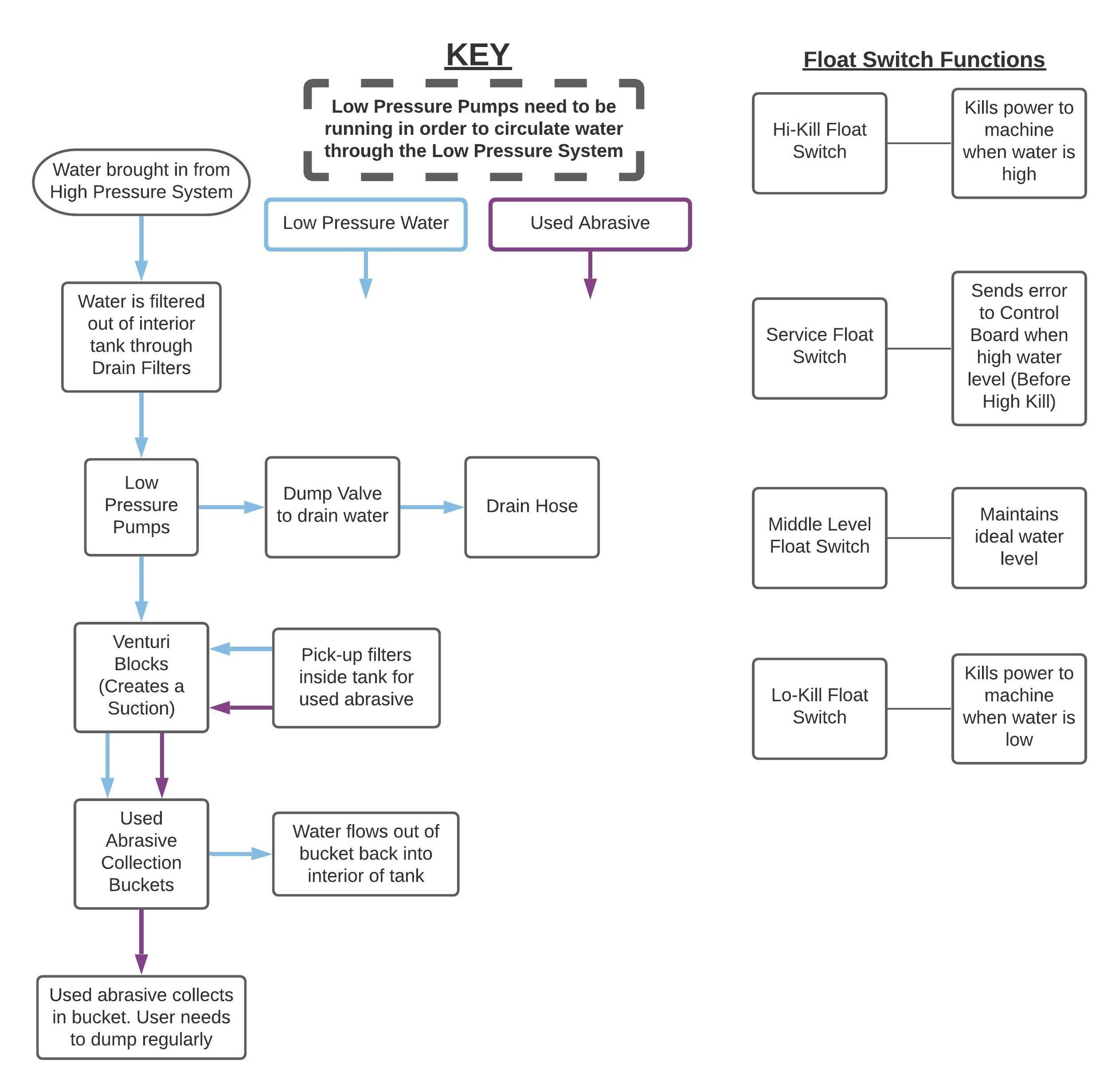
One of the most convenient features of WAZER is that it removes the Used Abrasive from the tank. The system will require some regular maintenance to keep it running smoothly. When things aren’t working as expected this section will help you diagnose what is not working and point you to resources to get things running smoothly.
This section will help identify the root cause of your problem when you notice a problem in the way the Wazer moves the Cutting Head
This section will you to identify the root causes when the water level in the tank is abnormally high or abnormally low. Suggested solutions are also provided.
Tutorials
This articles formalized several term that usually used in a cut project, and also list out all the steps needed from conceptualization to final cut execution.
This tutorial will walk you through converting the edges in an image into vector paths which you can then cut. We use a free Photoshop type program called Gimp to do this. You can accomplish the same process with other software in much the same way.
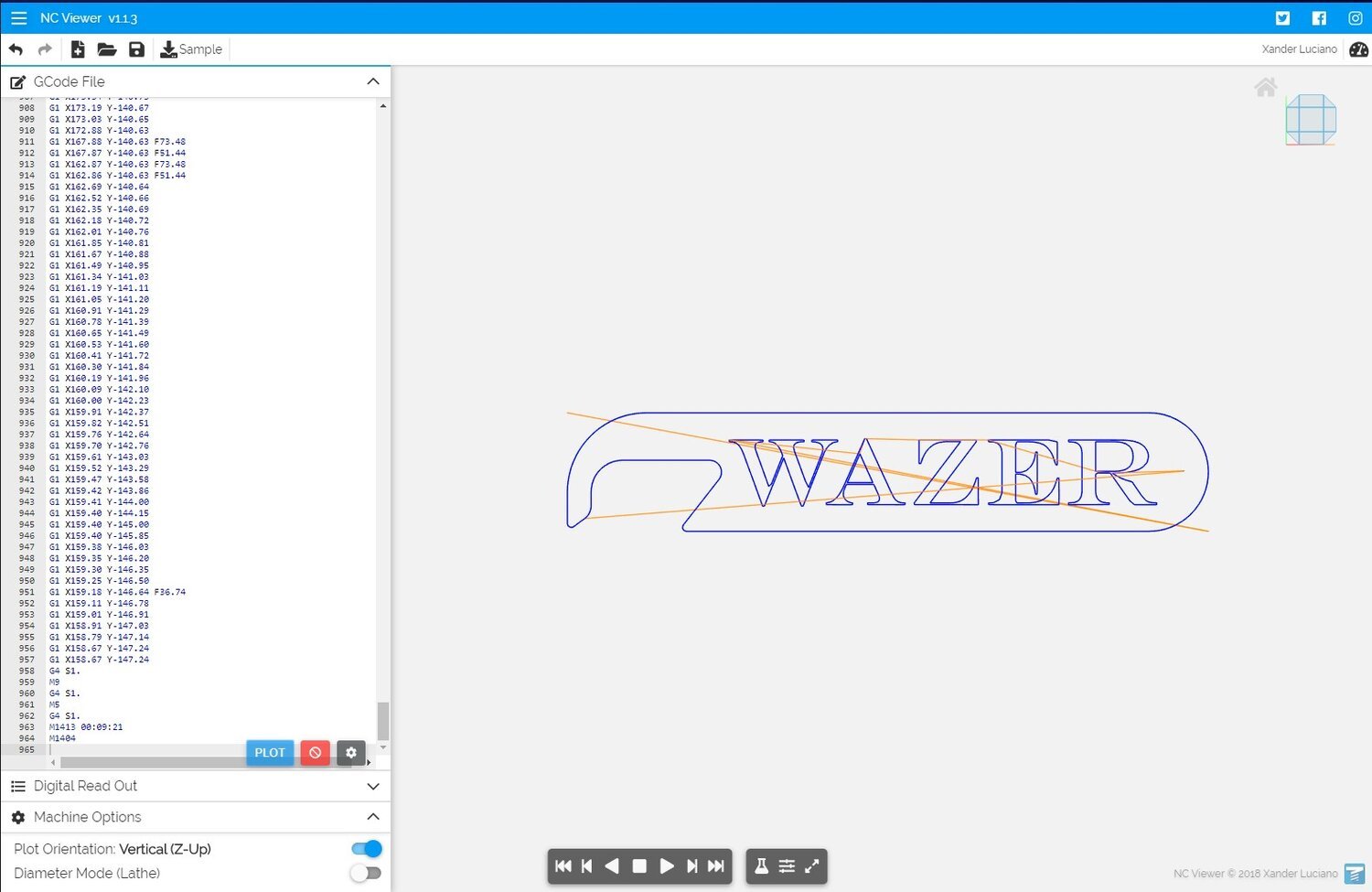
This is an explanation and dissection of the WAZER G-code structure so that you can understand how WAZER is interpreting the series of commands that WAM generates. These are all critical for your WAZER to function correctly and safely
The WAZER team regularly uses this method to see how the material is to be cut by the WAZER. It can help you understand the order parts will be cut out and the path that the machine will take
The WAZER team regularly update this page to reflect the operation procedure of the most commonly used CAD software.
This guide will teach you how to accurately cut internal feature in a stock material that has existing shape you want to keep.